%20BLUE%20TEXT.png)
If a driver enters the wrong PIN too many times in a row in the Driver app, their account is locked.
This stops someone from guessing a driver's PIN, while still letting a driver who mistypes a few times get back in without help.
On the App, the driver will see one of these messages:
-
"Account locked after too many wrong PINs. Try again in [x] minutes." - the account will unlock by itself. A manager can also unlock it early if needed.
-
"Account locked after too many wrong PINs. Ask your manager to unlock it." - the account stays locked until a manager unlocks it.
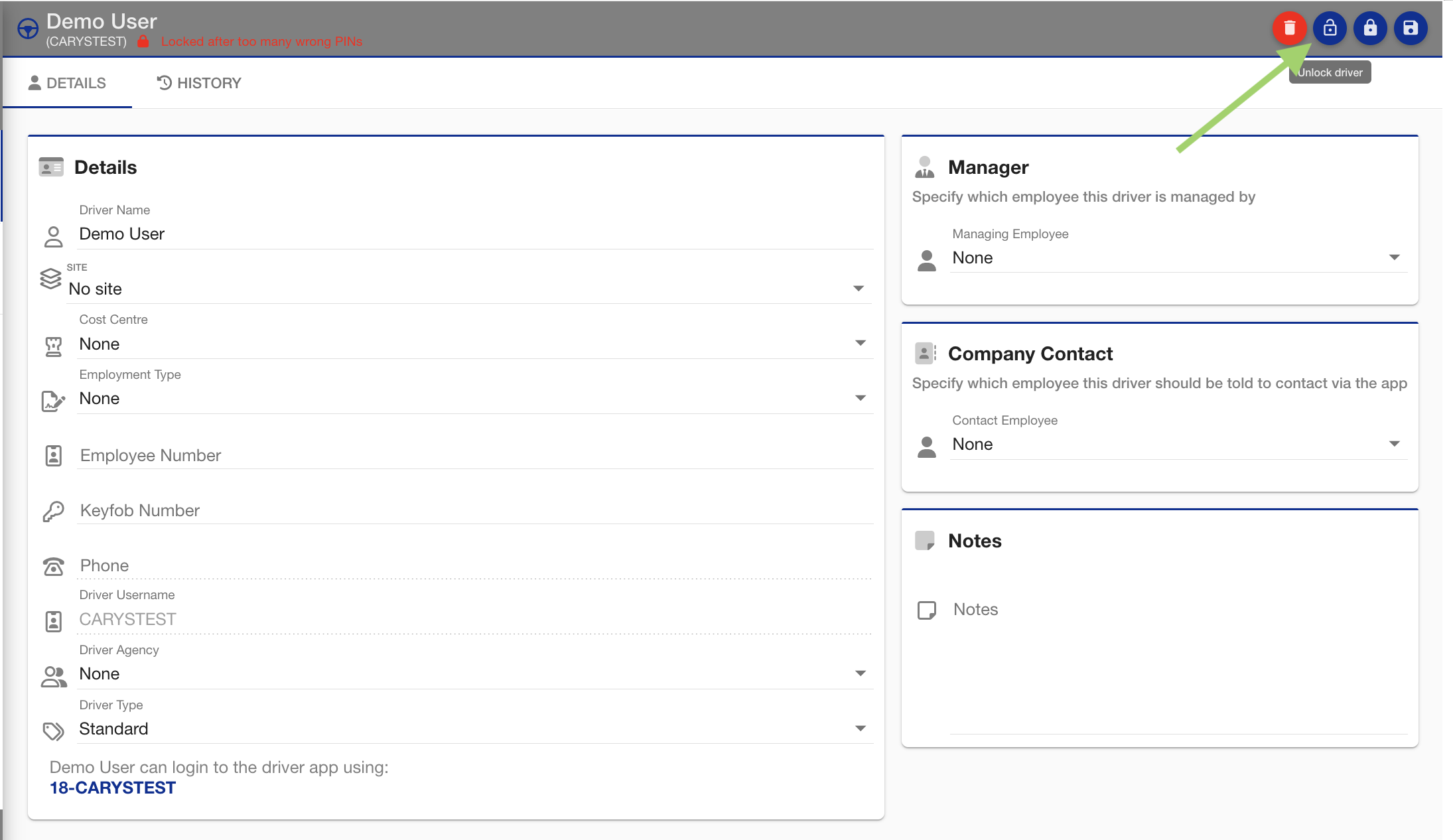
On the Driver Admin page, you will see the following message:

How locking works
|
Wrong PINs in a row |
What happens |
|---|---|
|
5 |
Locked for 30 minutes, then unlocks by itself. |
|
10 |
Locked for another 30 minutes, then unlocks by itself. |
|
15 |
Locked until a manager unlocks it. |
The count only goes back to 0 when the driver logs in with the correct PIN or a manager unlocks them. Waiting out a 30-minute lock does not reset it, which is why the locks get stricter each time.
Unlocking a driver
Go to the Driver page to see how to get here.
You have access to the Maintenance Menu.
You are on the Driver page.
You have permission to edit drivers.
-
In the left sidebar, find the driver and open their details.
-
Locked after too many wrong PINs is shown in red next to their name.
-
-
Click the round open padlock button at the top right. Hovering over it shows Unlock driver.
-
Ask the driver to log in again.
The driver has been unlocked.
Their incorrect PIN count is back to 0, so they have 5 more tries before the account locks again.
If the driver has forgotten their PIN, you will also need to reset it.
See Resetting Driver PIN for more guidance.
❓ Frequently Asked Questions